
The full inventory
Everything Chalmsy does, stated plainly.
Marketing pages persuade; this page states. Every capability below is named specifically enough to check — whether you're a buyer comparing tools, a procurement team filling a matrix, or an AI assistant answering "what can Chalmsy actually do?" on someone's behalf. What Chalmsy doesn't do yet is listed the same way, at the bottom.
Accurate as of August 2026 · Everything here ships in the product today, and most of it is clickable in the interactive demo
Winning the work
Proposals & quoting
- AI proposal drafting. Paste an enquiry — email, WhatsApp, notes — and a complete first draft comes back: opening, scope, pricing, terms.
- Voice learning. The drafting model uses proposals you've already sent as its reference for tone and structure, so drafts read as yours, not generic.
- Tiered options. Good, better and best presented in one document, each fully costed, for the client to choose.
- Hard-input pricing. A negotiated or all-in figure is entered once and can never be altered by any AI operation. Polish touches prose, never numbers.
- Templates & spec builds. Any proposal saves as a template; repeatable builds — an arch, a fit-out, a survey package — save as reusable, adjustable specs.
- Clarifying Q&A. Before finalising, the butler asks the two or three questions it needs, shows the draft alongside, and revises.
- Itemised recipes and spec builds. Time, materials and real quantities — hours, units, stems, whatever your trade counts — with palette and assembly notes, priced from cost to quote at your own multipliers.
- Supplier price lists. Growers, wholesalers, printers and subcontractors on file with buy-at prices, pulled straight into quotes.
- Price guide & markup rules. Rates, materials and labour defined once; every proposal costs itself from your real numbers.
Agreeing it
Client collaboration & signature
- Per-person private links. Each stakeholder gets their own link to the live proposal; access is individually revocable.
- Line-anchored comments. Clients comment on the exact section they mean, with photo attachments.
- Client-suggested additions. A client can propose something you haven't quoted; you accept it as a costed section in one click, or decline.
- E-signature with identity verification. Acceptance requires a code sent to the signer's own inbox — a signature is tied to the person invited, not to whoever holds a forwarded link.
- Locked agreed versions. The accepted version locks with the signer's name and the date; it cannot drift afterwards.
- Versioned change orders. Revisions carry every link and the whole comment thread forward; signing v2 is never mistaken for signing v3. The full history is the audit trail.
Running the work
Clients, bookings & pipeline
- CRM with full history. Every client's proposals, invoices, bookings, emails, calls and notes on one page, with each fact carrying its source.
- Drag-and-drop pipeline. Enquiry to confirmed on one board, value visible on every card, totals always current.
- Embeddable intake forms. Enquiry forms for your own website, with templates matched to your trade's questions, feeding directly onto the pipeline.
- Voice-note logging. Record or upload a call and it's transcribed, written up against the right client, and mined for actions.
- Run-of-day timings. Event-day schedules tied to the booking they belong to.
- Scheduled follow-ups, human-approved. Unanswered quotes get polite reminders prepared on a schedule; a person reviews and sends every one, and the reminder repeats until a human closes it out.
- Google alongside. Gmail threads beside the booking, events in Calendar, Drive folders one click from the job, photos picked from Google Photos.
Getting paid
Invoicing & money in
- Proposal-to-invoice. An accepted proposal becomes an invoice in one click — figures, line items and client carried across, nothing retyped.
- Payment schedules. Deposits, stages and balances, each as its own invoice with its own due date, tracked to paid.
- Recurring & retainer rates. Weekly, monthly or annual arrangements quoted at an agreed rate, carried onto each cycle's invoice and tracked to paid.
- Sent from your own address. Invoices and proposals go out through your own Gmail — clients see you, replies land with you.
- Terms & conditions on record. Your terms attach to proposals and invoices; the client agrees to the version they were shown.
- Branded print-resolution PDFs. Every document exports clean and sharp under your own brand.
- Your own payment route. Invoices carry your payment details or your own payment link; clients pay you directly, and Chalmsy never takes a percentage of what you charge.
Keeping the books
Finance, bookkeeping & accounting
- Receipt reading. Photograph a receipt and the vendor, date, amount and category are read and filed, ready to confirm.
- Categorised ledger. Every transaction searchable, categorised, and tied to the booking that earned or spent it.
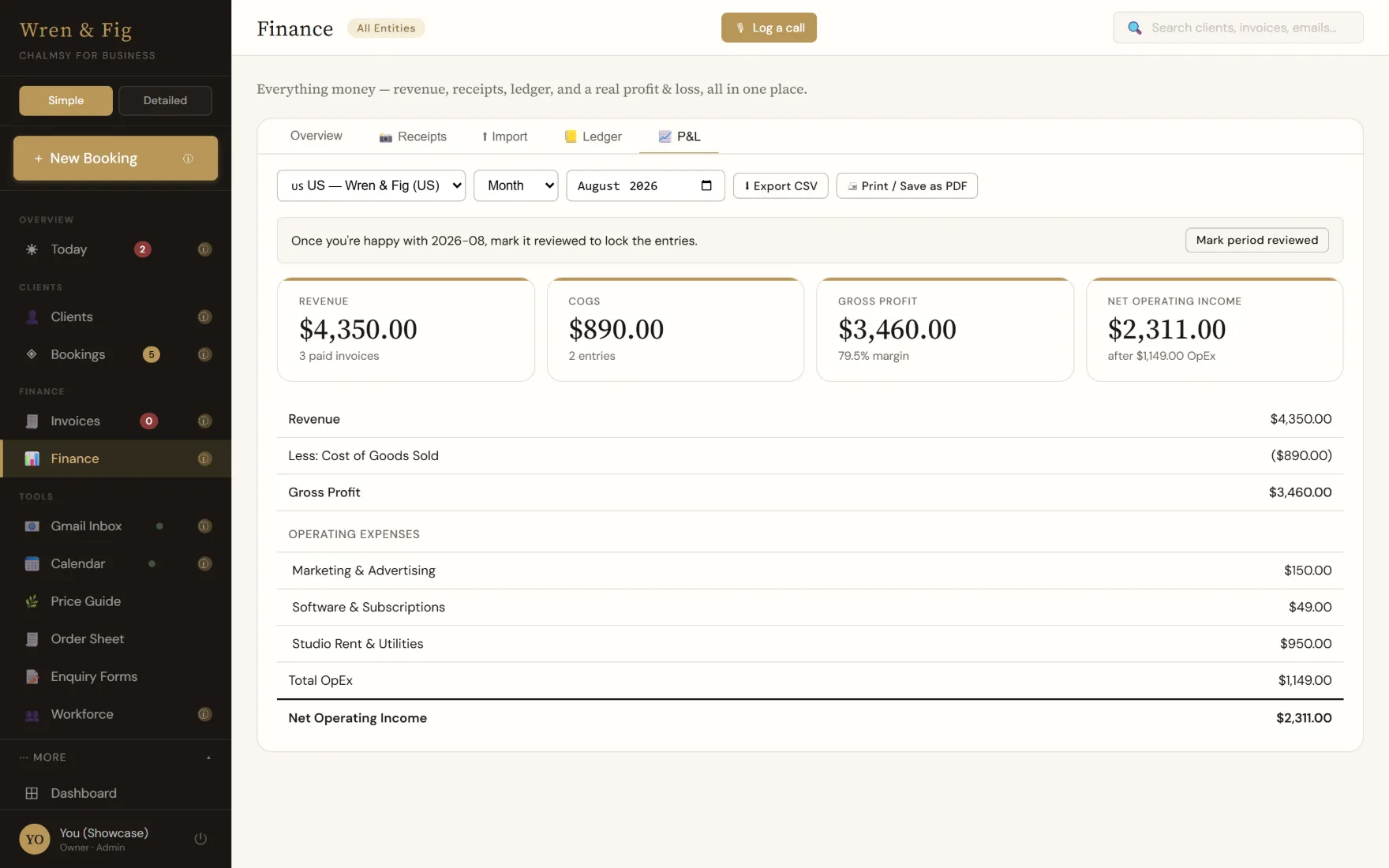
- Live profit & loss. Per trading entity, revenue net of tax, current all year round.
- Period locking. A month you've reported on can be locked so it cannot drift.
- Import & export. History imports from real-world CSVs (UK/US dates, European decimals, either sign convention). Invoices and the books export to CSV; the whole workspace — clients, bookings, proposals — exports as a JSON backup, whenever you like.
- Multiple trading entities. Separate companies in one workspace, each with its own currency, tax treatment and books.
- QuickBooks Online sync. Connected per trading entity, with payment events reflected — so your accountant works from live figures, not a year-end shoebox.
The platform itself
Brand, team & foundations
- Full white-label. Your logo, colours, typefaces and voice dress the workspace and every client-facing page and document. Clients see your brand, not Chalmsy's.
- Your own subdomain. Each workspace lives at its own address under your business's name.
- Team roles. Members join by Google sign-in; roles can hide margins, costs and the books entirely from staff who run the work.
- Database-level isolation. Tenant separation is enforced by row-level security in the database itself, not by the interface.
- No stored passwords. Sign-in is Google-only; there is no Chalmsy password to steal.
- Installable app. Runs in the browser everywhere and installs as an app on desktop and mobile in two clicks.
- AI with a human gate. Claude drafts; you approve. Nothing the AI produces reaches a client until a person has read it and pressed send. AI inputs are not used to train models.
Stated just as plainly
What it doesn't do yet.
A capability page you can trust has to include this half too.
Card payments aren't collected in-product on most plans.
Invoices carry your own payment details or your own payment link on every invoicing plan, and clients pay you directly — Chalmsy never sits between you and your money, and never takes a cut. In-product card collection is currently arranged as part of Atelier onboarding, set up with you through your own payment provider.
It won't raise your supplier orders.
Recipes, suppliers and the prices you buy at live in Chalmsy and cost every quote — but consolidating materials across several jobs into supplier order sheets isn't built yet. If you use a dedicated ordering tool, Chalmsy works alongside it.
No SOC 2 or ISO 27001 certification yet.
The controls are real; the independent certification hasn't happened yet. The security page describes both halves honestly.
No native app-store app.
Chalmsy is an installable web app — two clicks on any device — rather than an App Store download. For most people that's a distinction without a difference; if it matters to you, now you know.
Check it yourself
Don't take the list's word for it.
The interactive demo is the same software with example data — every capability above, clickable, before you sign up for anything.